Calendar 04
Overview
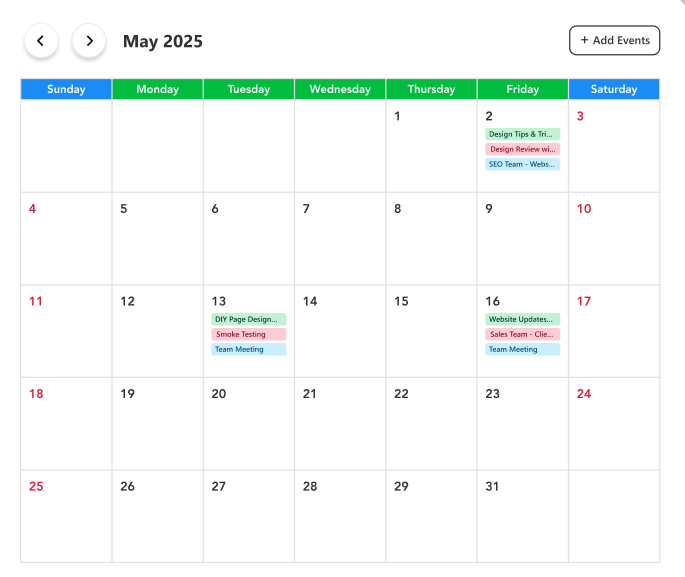
A full monthly calendar view of team activities and meetings. Events are color-coded by category, allowing users to manage, view, and add new events easily.
Configuration
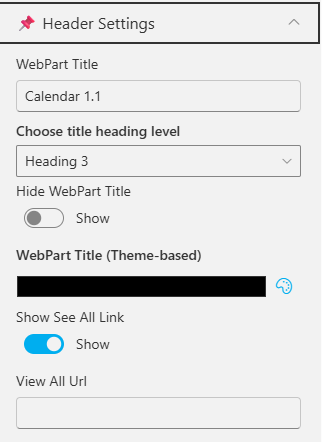
Header Settings
📸 View Header Settings Screenshots
| Name | Purpose | Example / Options |
|---|---|---|
| WebPart Title | Specify a title for the Calendar Web Part. | “Calendar 4” |
| Choose title heading level | Select the heading level (H1–H6) for the WebPart title. | Heading 3 |
| Hide WebPart Title | Toggle to show or hide the WebPart title. | Show / Hide |
| WebPart Title (Theme-based) | Set a theme-based title color or style for the WebPart. | Color Picker |
| Show “See All” Link | Display or hide the “See All” link for calendar navigation. | Show / Hide |
| View All URL | Provide a URL for the “View All” button to redirect users. | /sites/events/all-events |
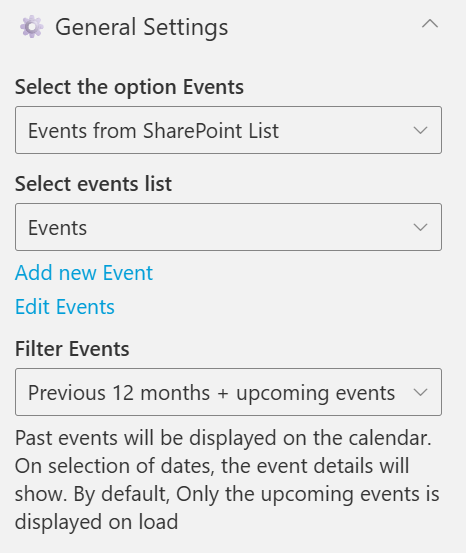
General Settings
📸 View General Settings Screenshots
| Name | Purpose | Example / Options |
|---|---|---|
| Select the option Events | Select the event source for the Calendar. | Events from SharePoint List |
| Select events list | Choose the SharePoint list from which events will be displayed. | Dropdown of event lists |
| Filter Events | Control which past and upcoming events appear. | “Previous 6 months + upcoming events” |
Appearance Settings
📸 View Appearance Settings Screenshots

| Name | Purpose | Example / Options | ||
|---|---|---|---|---|
| Show Month/Week/Day Button | Toggle to show or hide the Month/Week/Day Button | Yes / No |