News 05
Overview
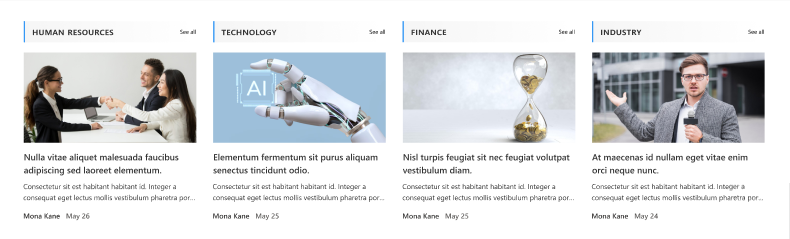
This News web part showcases recent articles and events with eye-catching images and clear categorization by topics like Finance, Industry, HR, and Technology. Users can quickly browse and filter news items, keeping everyone informed and connected on the SharePoint site.
Configuration
Header Settings
📸 View Header Settings Screenshots
| Name | Purpose | Example / Options |
|---|---|---|
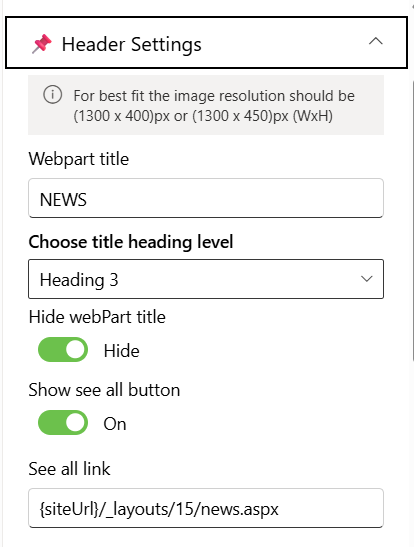
| Webpart title | Specify a title for the News Web Part. | “NEWS” |
| Choose title heading level | Choose the heading level for the webpart title. | H1 / H2 / H3 / Custom |
| Custom font size for title | Specify a custom font size for the webpart title (only visible when “Custom” heading level is selected). | 24px |
| Hide webpart title | Toggle to show or hide the Web Part title. | Show / Hide |
| Show see all button | Display or hide the “See All” link for News navigation. | Show / Hide |
| See all link | Provide a URL for the “See All” button to redirect users. | {siteUrl}/_layouts/15/news.aspx |
General Settings
📸 View General Settings Screenshots
| Name | Purpose | Example / Options |
|---|---|---|
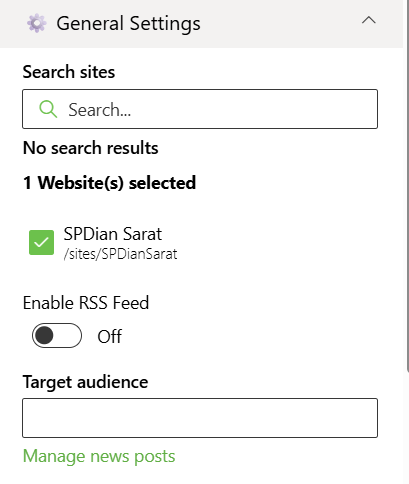
| Search sites | Search the SharePoint sites source for the News. | SharePoint Sites available in the tenant. |
| Website(s) selected | Select the SharePoint sites source for the News. | Search results based upon the key search |
| Enable RSS Feed | Fetch News from RSS feed | On / Off |
| Target audience | Enter the person or group as a target audience for the News Web Part | People Picker |
| Manage news posts | Create new News posts or update the existing news posts | Link |
Layout Settings
📸 View layout Configuration Screenshots

| Name | Purpose | Example |
|---|---|---|
| Choose layout | Choose the layout for the News Webpart | Dropdown |
Appearance Settings
📸 View Appearance Settings Screenshots
| Name | Purpose | Example / Options | |
|---|---|---|---|
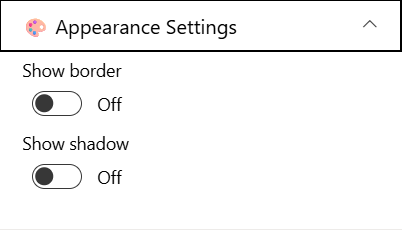
| Show border | Toggle to show or hide the border of the banner. | On/Off | |
| Show shadow | Toggle to show or hide the shadow of the banner. | On/Off |