Training
Overview
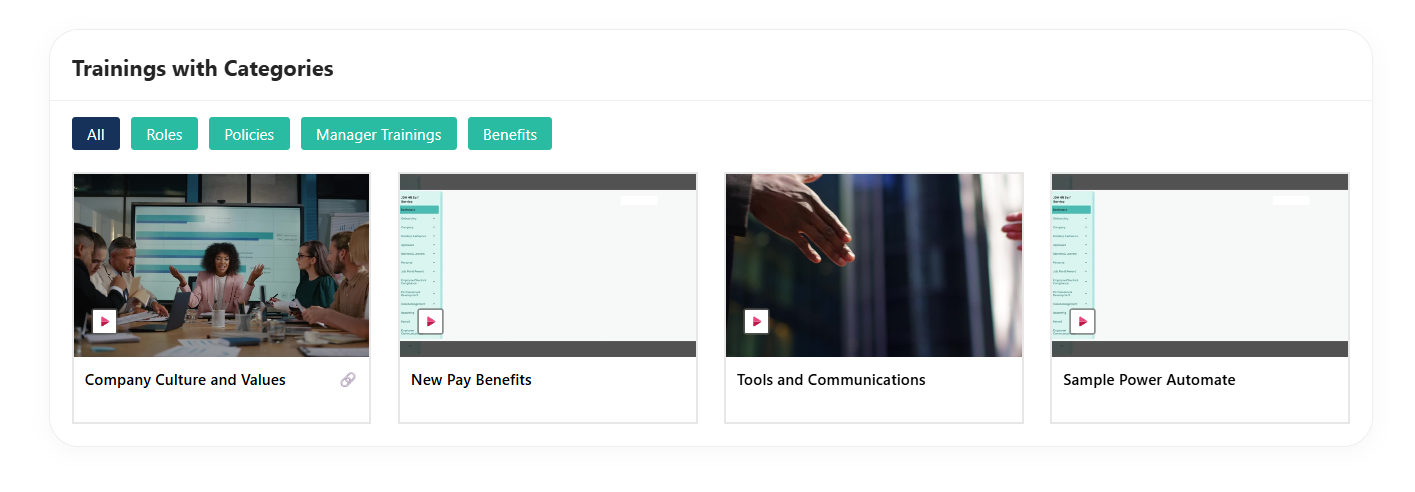
The Training Web Part with Categories is an enhanced, custom-built solution designed to transform how training content is managed and consumed within SharePoint. Previously, the web part functioned as a simple document viewer, where training materials were uploaded to a document library and displayed as a flat list. While functional, it lacked structure, flexibility, and an engaging user experience. With this upgrade, the web part evolves into a well-structured and interactive training hub.
Configuration
Header Settings
📸 View Header Settings Screenshots
| Name | Purpose | Example / Options |
|---|---|---|
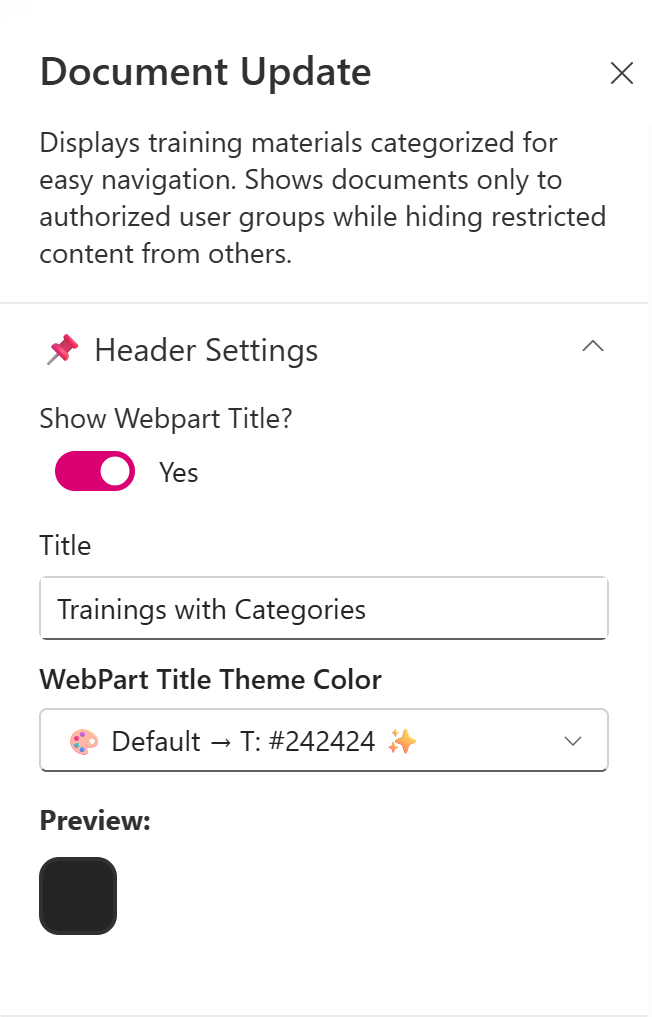
| Show WebPart Title? | Toggle to show or hide the WebPart title in the layout | Yes / No |
| Title | Allows entering a custom title for the WebPart | “Training with Categories” |
| WebPart Title Text Color | Defines the title color using dropdown with site theming options | #242424 |
| Preview | Displays theme preview | Color Block Display |
General settings
📸 View General Settings Screenshots
| Name | Purpose | Example / Options |
|---|---|---|
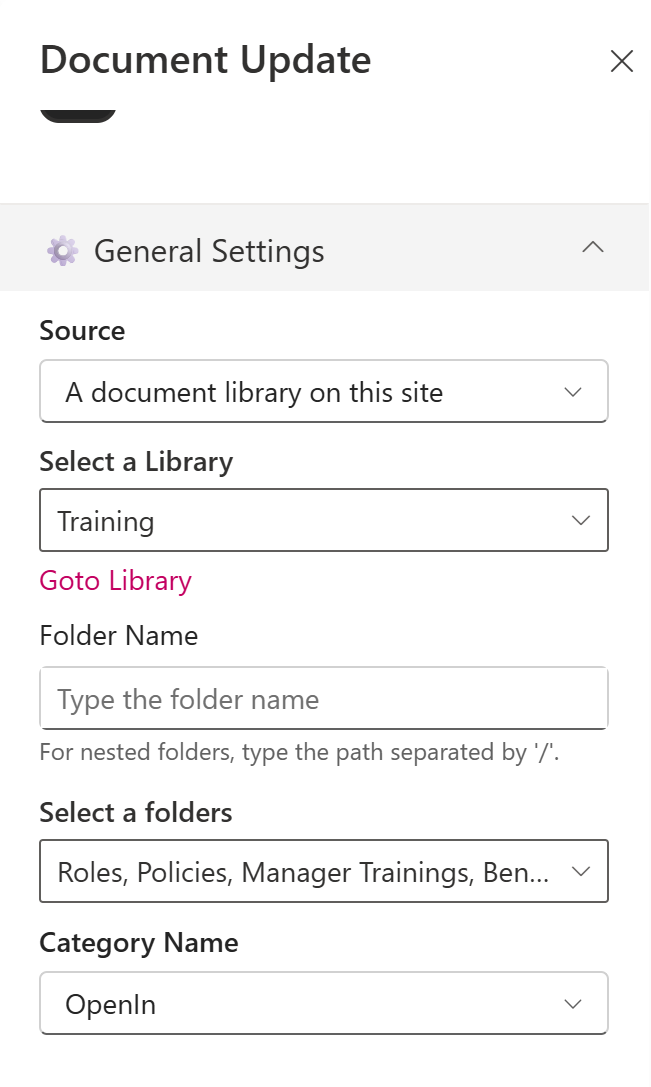
| Source | Source of the Document library | A document library on this site |
| Select a Library | Choose a specific document library from the site | Training |
| Folder Name | Optional text input for specifying a sub-folder | (Blank) |
| Select a folders | Checkbox to show all folders | Checkbox Selection |
| Category Name | Select the metadata column used for category filtering | Category |
| Filter the Category Value | Choose one or more category values to filter items | Choice 1, Choice 2, Choice 3 |
Appearance Settings
📸 View Appearance Settings Screenshots
| Name | Purpose | Example / Options |
|---|---|---|
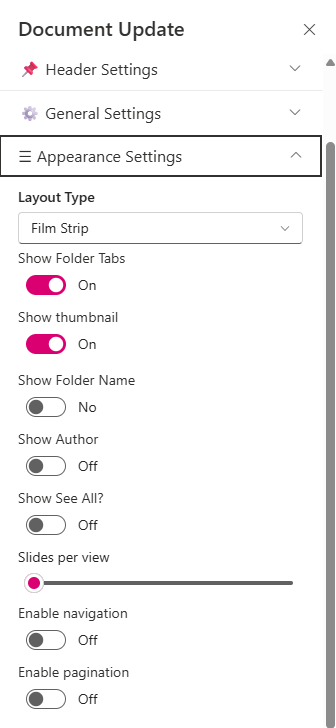
| Layout Type | Controls how content is visually displayed | Film Strip |
| Show Folder Tabs | Toggle to display the folder name preview | On |
| Show Thumbnail | Toggle to display file previews | On |
| Show Folder Name | Toggle to display folder names | Off |
| Show Author | Toggle to show the file creator | On |
| Show See All ? | Toggle to show/hide the see all | Off |
| Slides per View | Number of items shown per slide | 4 |
| Enable Navigation | Toggle to enable left/right carousel arrows | Off |
| Enable Pagination | Toggle to enable pagination controls | Off |
Theme Settings
📸 View Theme Settings Screenshots

| Name | Purpose | Example / Options |
|---|---|---|
| Button Theme | Display the site branding theme color for folder tabs | Dropdown |
| Preview | Displays theme preview for folder tabs | Color Display Block |
Target Audience
📸 View Audience Settings Screenshots

| Name | Purpose | Example / Options |
|---|---|---|
| Target Audience | Choose the people to show the webpart | People Picker |
About
📸 View About Screenshots

| Name | Purpose |
|---|---|
| Developer Info | Indicates the web part is built by SharePoint Designs |
| Version | Display the version number of the webpart |